


Written by Ravinder Sangha
March 4, 2025
Featured product
Product Name Here
Explore the latest and most innovative SaaS solutions that are transforming industries. Stay ahead with our curated selection of cutting-edge products.

Debugging third-party Android apps can be a challenging task, especially when dealing with complex dependencies, security restrictions, or obfuscated code. Whether you are a developer, security researcher, or tester, having the right tools can make all the difference.
According to a 2023 report by Statista, Android dominates the global mobile OS market with a 70% share, making efficient debugging tools crucial for developers worldwide. In this article, we will explore ten of the best tools available for debugging third-party Android applications.
1. ADB (Android Debug Bridge)
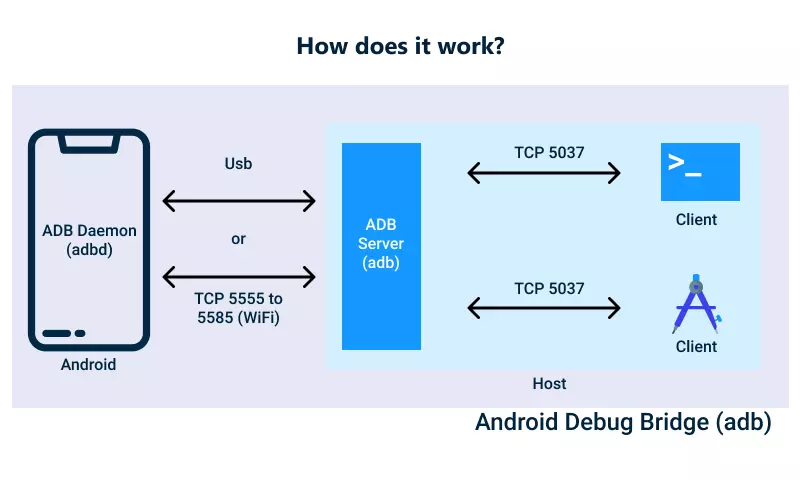
ADB is the Swiss Army knife of Android debugging, allowing developers to interact with an Android device via the command line. It is a versatile tool that enables users to install and uninstall apps, access the device’s shell, push and pull files, and even debug apps remotely.
One of its most powerful features is adb logcat, which provides real-time logging information from the Android system and applications. This can be invaluable for diagnosing crashes, monitoring performance, and identifying errors. Developers also use adb shell to execute commands directly on the device, making it a fundamental tool in any debugging toolkit.
Example:
If an app is crashing without displaying clear error messages, running adb logcat can help track down the cause by providing detailed logs of the error.
2. Frida
Frida is a powerful third-party Android debugging tool used for dynamic instrumentation, allowing developers and security researchers to analyze, modify, and manipulate applications at runtime. Unlike traditional debugging methods, Frida enables real-time interaction with running applications without needing source code access, making it valuable for security testing, reverse engineering, and API monitoring. It works by injecting JavaScript or Python scripts into target processes, enabling developers to trace function calls, inspect memory, bypass security mechanisms like certificate pinning, and modify app behavior on the fly.
Frida runs on multiple platforms, including Android, iOS, Windows, and Linux, and requires setting up a Frida server on the target device to facilitate remote debugging. With its extensive scripting capabilities, Frida is widely used for application security assessments, malware analysis, and debugging third-party apps that lack native debugging support.
3. Wireshark

The network protocol analyzer Wireshark enables application developers to check data packets which their applications transfer back and forth. Exclusive use cases for Wireshark include debugging apps when they require toolsets such as APIs and cloud services.
The network analysis features of Wireshark allow developers to check for both incorrect requests and information leakage on HTTP, HTTPS and TCP protocols. Security professionals apply Wireshark to scrutinize possible network communication weaknesses and vulnerabilities.
Use case:
Wireshark enables developers to analyze network issues that prevent third-party applications from performing correctly by showing HTTP or HTTPS requests alongside their headers and response statuses.
4. Charles Proxy
The debugging tool Charles Proxy serves as a preferred solution for developers to examine and change HTTP and HTTPS internet traffic between Android applications. Through this development tool developers get the capability to monitor network requests as well as edit them before using them for testing purposes.
The valuable feature of Charles Proxy includes SSL decryption which allows developers to observe encrypted HTTPS traffic. The tool provides strong capabilities for API reverse engineering as well as debugging server issues and security vulnerability testing.
Example:
An incorrect loading issue in an app can be diagnosed by using Charles Proxy through its ability to detect server response problems and API call problems and data formatting errors.
5. JD-GUI (Java Decompiler)
ΙΚΟ provides developers with a strong tool that aids Java-based APK file decompilation so developers can study third-party application source code. The tool proves important for developers seeking knowledge about app functionality or risk assessment for potential security threats.
Analysts who evaluate suspicious applications for concealed dangerous code often employ JD-GUI for this purpose. App architecture study and learning from high-quality applications becomes possible using JD-GUI.
Fact:
The inspection of malware in third-party applications by numerous malware analysts depends on JD-GUI for this task.
6. APKTool
The developers who work with APKTool gain access to Android application decompiling and recompiling features to modify resources and analyze structural components. The main difference between APKTool and JD-GUI lies in their function as APKTool decrypts Java code in addition to managing the APK file resource elements such as XML components and images.
Through APKTool developers have the power to detect resource-related bugs in applications and they can alter application functionality as well as develop custom code corrections. This tool serves three main functions – localizing apps by translation, helping reverse-engineers and supporting security tests through its capabilities.
Example:
The resource files within the APK can be edited through APKTool to test possible solutions for loading bugs in third-party apps when developers lack the original source code access.
7. Mitmproxy

The open-source interactive tool named Mitmproxy functions as an HTTPS proxy which enables users to intercept while monitoring and altering network traffic lines. The tool operates as a different option to Charles Proxy by offering network debugging functionality.
Development teams can use Mitmproxy to evaluate application behavior when dealing with different network environments and server feedback. API debugging and security analysis are major benefits of this tool thanks to its intercepting capability.
Analogy:
The proxy function of Mitmproxy establishes itself as a bridging element between applications and servers to show live traffic modifications.
8. Xposed Framework

Developers employ Xposed framework so they can transform system as well as app behavior while the APK stays intact. Xposed functions as a prominent framework to build custom changes for Android applications alongside new functionality as well as modify app testing conditions.
Through the Xposed framework developers can create their own modules to alter third-party applications even when they remain unmodified. Within Xposed developers can efficiently debug the user interface and inject logging statements and explore new features in applications.
Use case:
Xposed enables developers to modify third-party applications by altering their UI characteristics directly from the source code while preserving the original APK unmodified.
9. Ghidra

The NSA has produced Ghidra which stands as a leading reverse-engineering instrument. The tool offers complete static analysis features that enable researchers to analyze compiled Android binaries so it has become a key assessment tool for security specialists.
The machine code analysis performed by Ghidra differs from JD-GUI since it handles lower-level work by analyzing machine code while dumping native libraries. The tool serves analysis of intricate programs to identify invisible features inside them.
Fact:
The open-source release of Ghidra in 2019 made it rise to become one of the primary tools for examining Android applications at their binary stage.
10. Objection
Security analysts can use Objection to explore Android applications during runtime while bypassing the need for root privileges. Security professionals widely use this tool for penetration testing and security analysis purposes.
Using Objection enables users to bypass SSL pinning so they can extract sensitive information while injecting code into running applications. Security professionals and ethical hackers consider this tool as essential due to its critical role during their work.
Example:
Security researchers leverage Objection for bypassing SSL pinning to analyze the encrypted communications between an application and its server system.
Conclusion
Correct tools for third-party Android app debugging exist to serve various use cases among the selection presented above. The mentioned tools supply developers with essential capabilities to inspect network traffic and modify app behavior in addition to APK decompilation features. The Android ecosystem evolution requires developers testers and security professionals to keep these powerful debugging solutions at their disposal for their work.

Explore newly launched and trending digital products on our home page
Discover the Future of SaaS Innovation
Welcome to Next Big Product
Explore the latest and most innovative SaaS solutions that are transforming industries. Stay ahead with our curated selection of cutting-edge products.
Related Articles
Detailed Tutorial & Shortcuts For Protonmail
Explore the latest and most innovative SaaS solutions that are transforming industries. Stay ahead with our curated selection of cutting-edge products. Every person should possess an unbreakable vault containing their secret diary which requires only their...
Can you send emails from notion
Explore the latest and most innovative SaaS solutions that are transforming industries. Stay ahead with our curated selection of cutting-edge products.Notion stands among the top productivity platforms utilized by users in present times. Users can use Notion as their...