.png)
What is Listmargin?
Core Features
- Fee Stack Itemization
- Cliff Category Re-Rating
- Profit Margin Calculator
Pricing Details
Ideal For
Detailed Description
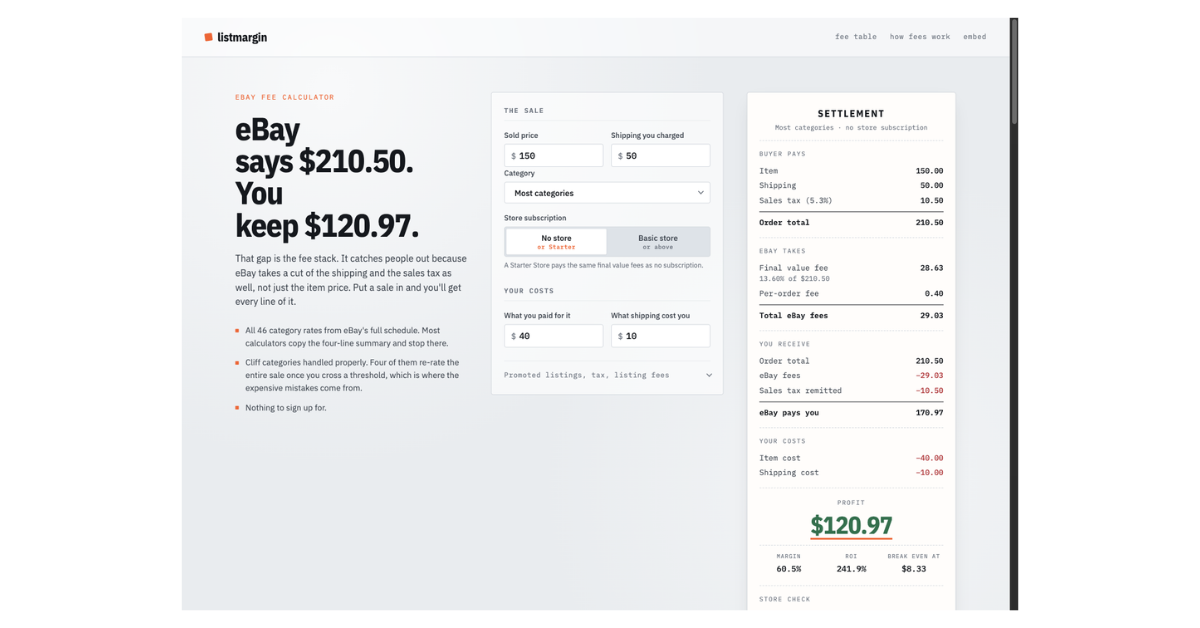
Listmargin is built around a single, stubborn question: what does a sale actually leave you? eBay quotes you a sale price, but what reaches your bank is that number minus a commission you probably guessed at, a per-order fee, and whatever you spent getting the thing shipped. Listmargin does that arithmetic properly. It functions as a precise eBay fee calculator, itemising the full fee stack for the category you actually sold in, including the cliff categories where crossing a threshold re-rates the whole sale. It is free, and there is nothing to sign up for.
The same engine powers an eBay profit calculator, pointed directly at the question that matters: profit, margin, ROI, and your break-even price. Beyond that, Listmargin breaks down eBay store fees, pricing every tier, showing the real fee discount by category, and calculating the sales volume where a subscription actually pays for itself. For eBay Motors, it handles vehicles that pay a flat fee and no final value fee, covering the bands, the deposit fee, and the traps. Insertion fees are also covered, including the 250 free listings and the precise rules for when you actually pay.
Listmargin also answers the broader question of why eBay fees are so high, explaining the three mechanics behind the fact that the fee applies to shipping and sales tax too. It tackles Promoted Listings, showing how the ad rate comes straight out of your margin and how to decide what your margin can afford. It even includes a sell-through rate calculation, acting as the sourcing signal that separates items that sell from items that sit. Every worked example eBay publishes is recomputed here, with both answers side by side, so you can see exactly how the calculations are made. You can also embed the calculator on your own page with a single snippet, free and without signup, with rates that update themselves. A browser extension puts the same maths directly on the eBay page you are already looking at, letting you work out a margin without ever leaving the listing. If you sell on eBay, Listmargin ensures you know your numbers before you commit to a sale.

AMA with Maker (0)