.png)
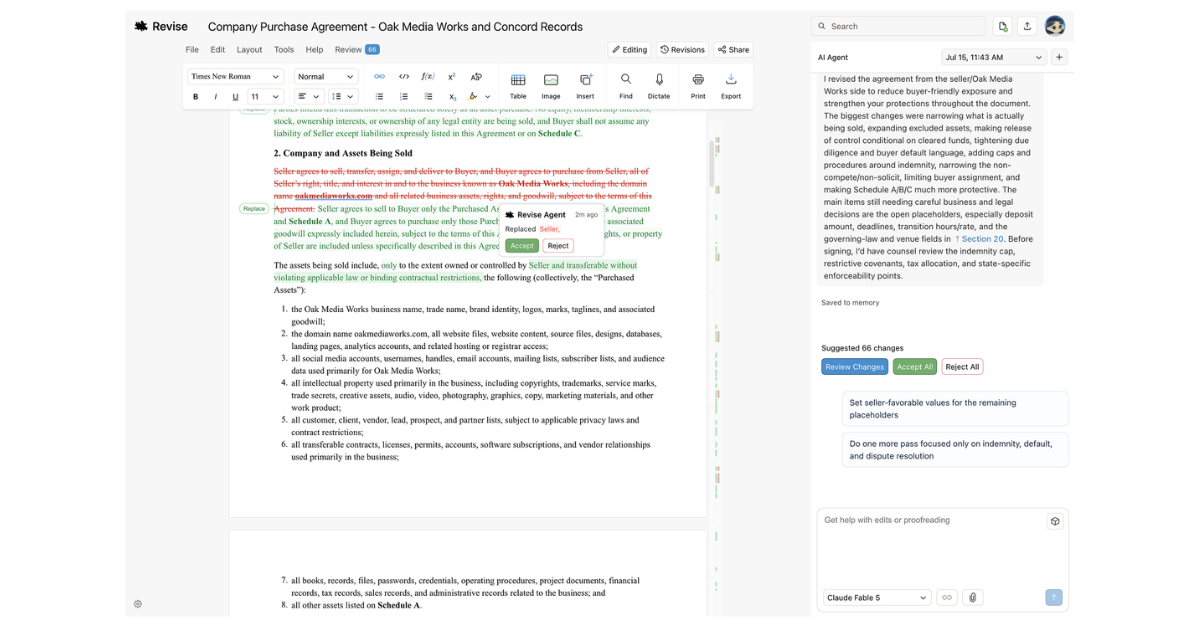
What is Revise?
Core Features
- Real-Time AI Suggestions
- Full Revision History
- Multi-Model AI Editor
Pricing Details
Ideal For
Detailed Description
Revise is an AI document editor that transforms how you write and edit by suggesting changes directly within your document. As a free word processor, it combines the familiar formatting tools of Google Docs or Word—headings, lists, tables, images, math equations, code blocks, and Mermaid diagrams—with a powerful built-in AI agent that drafts, edits, and proofreads alongside you. Every change is tracked for review, so you maintain full control over your content. To get started, simply paste text or upload a file, and Revise will handle the rest, with over 100,000 AI edits accepted per month by its users.
Tell Revise what changes you want, and watch it make suggestions in real-time. You can review and accept them individually or all at. Beyond simple corrections, Revise can make complex edits across full documents—explain your desired outcome, and the AI agent will search, think through a plan, and get it done. Whether you need to polish a grant proposal, write a psychological report, prepare an immigration declaration, answer an RFPL, tighten a legal brief, redline a contract, draft a medical appeal, update a compliance policy, draft board minutes, write a performance review, polish a client report, or rewrite technical docs, Revise adapts to your needs.
Every draft is saved automatically, allowing you to scrub through your full revision history and see exactly what changed—recover any earlier version anytime. Collaboration happens in real-time: share your documents with anyone and edit them together live, with people and AI in the same place. The AI is there when you need it, letting you switch seamlessly between writing yourself and prompting the AI within the same interface. Revise supports every leading AI model in editor—OpenAI GPT-5.6, Anthropic Claude, Google Gemini, and xAI Grok—so you can switch between them at any time. With full page-layout controls like margins, columns, and page numbers, long documents remain print-ready. Import your Word, Google Docs, and PDF files to get started, and export to DOCX or PDF anytime.
Get started free.

AMA with Maker (0)